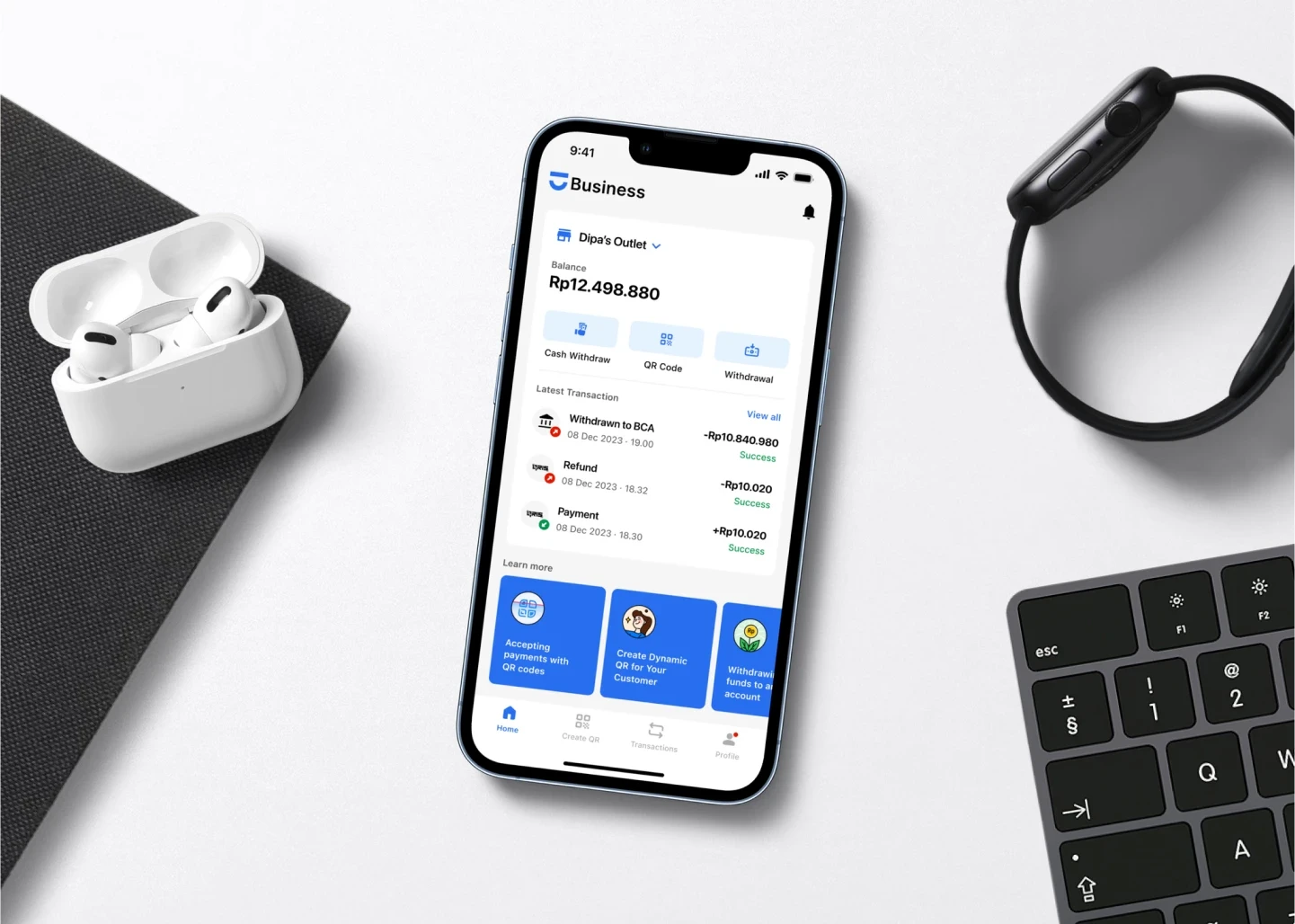
About
Dipay itself is a fintech startup that provides digital wallet services for online payments and non-cash transactions. Dipay is licensed by Bank Indonesia and offer various electronic payment services, including QR/QRIS-Based payment methods and bill payments. As the time being, Dipay had 3 apps: Dipay Personal, Dipay Business, and Dipay Enterprise.
In my role as a product designer, I craft and enhance the mobile apps (Dipay Business & Dipay Personal) features through competitor research, cross-functional team collaboration, and prototyping. My focus here is to ensure that the features meet the requirements (user, tech, & compliance), can be developed seamlessly, are intuitive, legible, accessible, and have a visually appealing design. Additionally, I take the chance to refine the design system, overhaul past designs, and create diverse design assets.
There are various projects when I was in Dipay, these include:
Dipay Business
Dipay Personal
Graphic Design
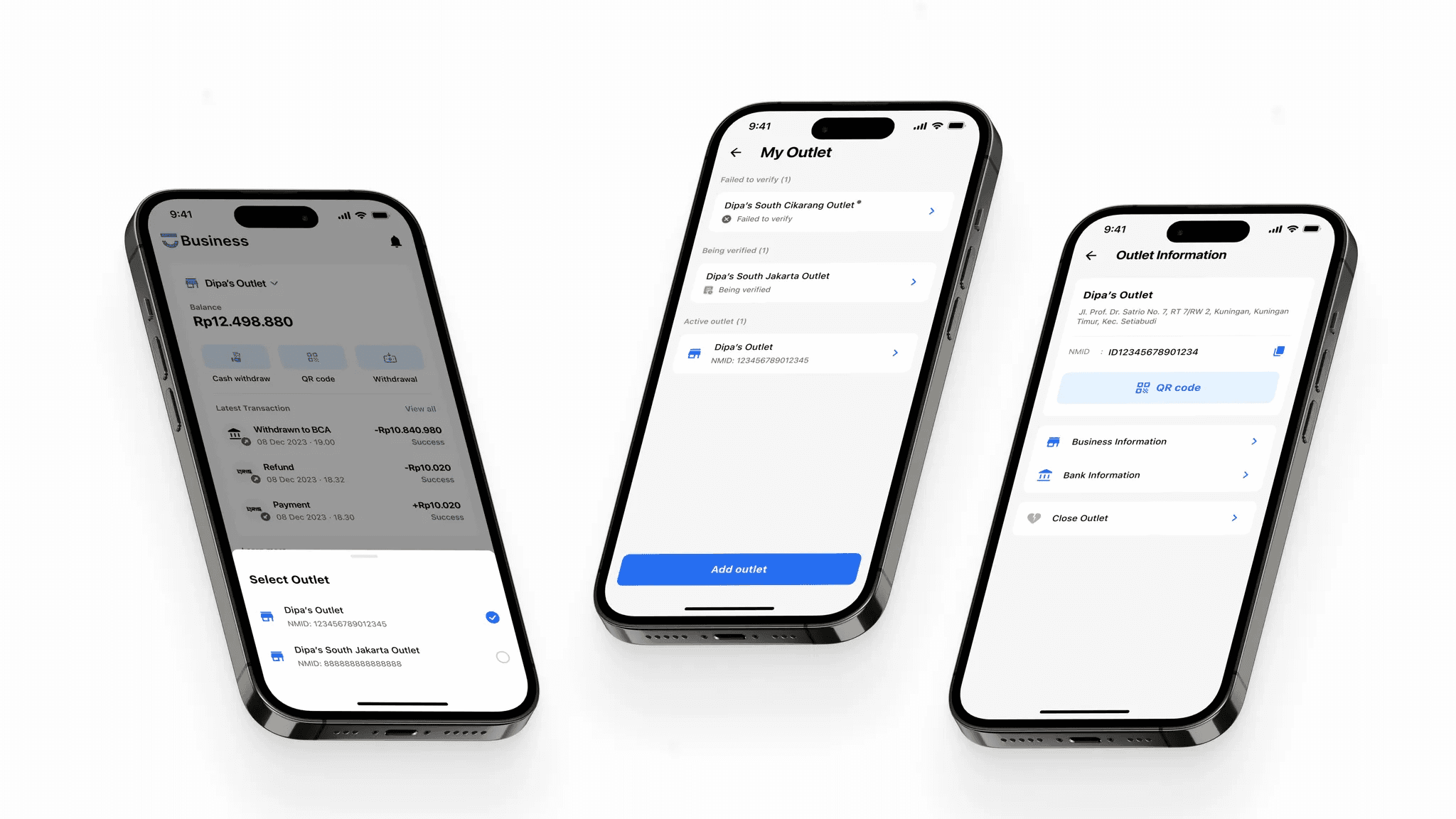
However, one project stands out as particularly innovative and impactful—the development of the multi-outlet feature.

Designing A Multi-Outlet Feature for Dipay Business
📍
This feature should be as simple and direct as possible, considering that the main user target comprises Indonesian MSMEs merchants, including those with limited technology knowledge.
The Challenge
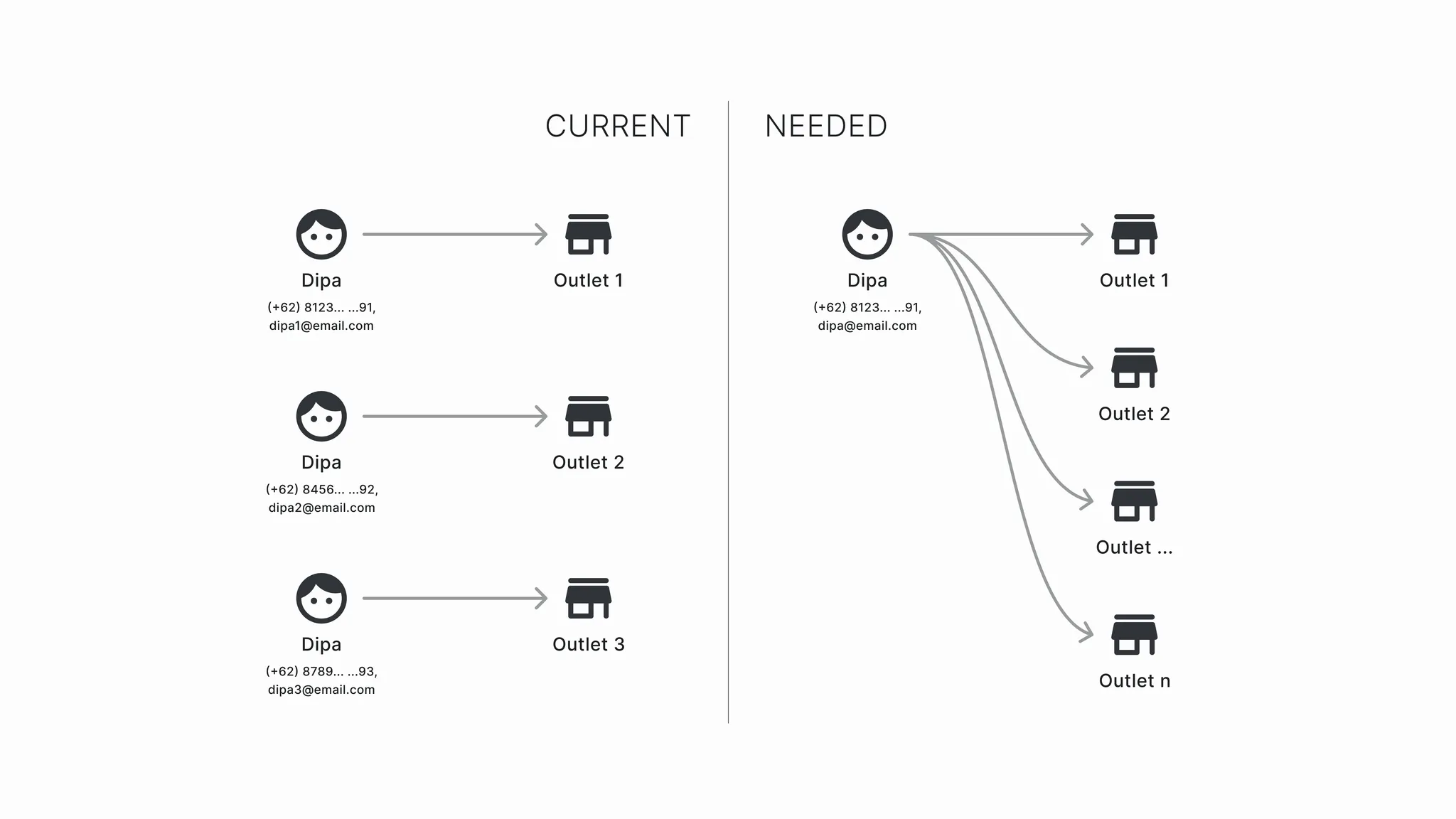
Merchants are facing challenges with registering and managing multiple outlets using the current Dipay Business system, which is designed for only one person/account to handle a single outlet. This limitation forces merchants to acquire new phone numbers and emails, leading to the inconvenience of frequent log-outs and log-ins when accessing different outlet accounts. To address this issue, a more efficient solution is needed, allowing merchants to register new outlets using a single account and facilitating easy switching between outlets within the app.
The Process
At its core, this process was about turning real merchant pain points into a solution that’s simple, scalable, and user-friendly. I mapped out problems, explored alternatives, and worked closely with teams to clarify what data mattered. Using Design Thinking as my main framework, I went through each phase—empathizing, defining, ideating, prototyping, and validating. The result is a clean and intuitive flow that reduces friction, improves efficiency, and supports future scalability across the platform.
Understand 💡
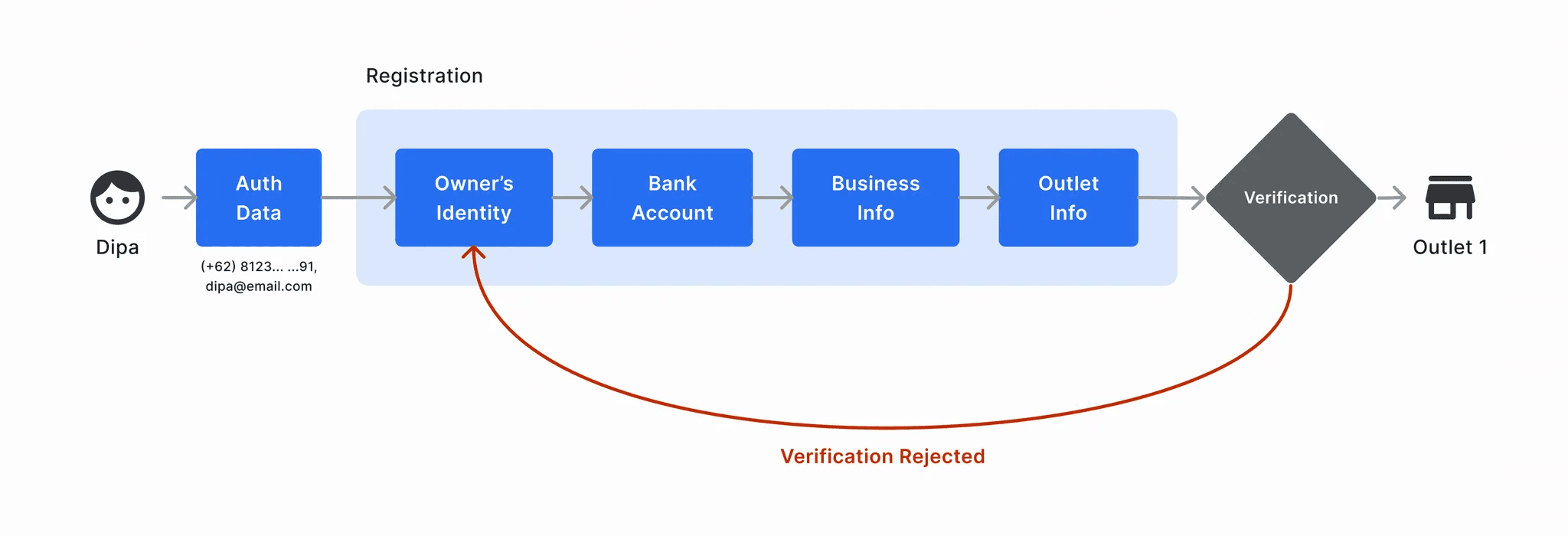
The initial step I took involved understanding the user registration process for outlets, including the flow and the required data. I examined the relationships between different data sets and how they connect to specific teams or divisions. Additionally, any identified problems or UX inconveniences were documented. The registration flow is predominantly illustrated in the image below, where users input personal data, bank account details, business information, and outlet information.
Research 🔍
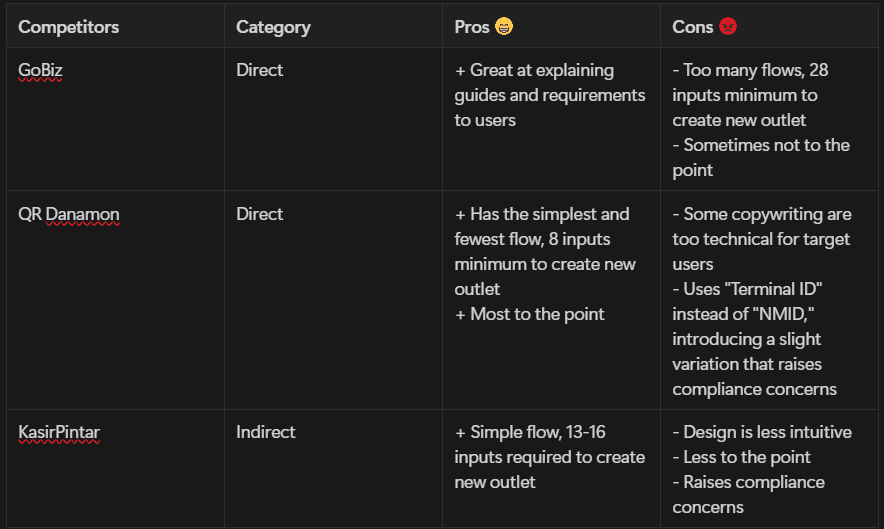
Competitors that have same or similar features were used as the benchmark: QR Danamon, GoBiz, and KasirPintar. Their flow and features were then analyzed to deepen the feature’s understanding, uncover strengths, weakness, opportunities, and innovative ideas. The table below shows the pros and cons between those apps.
Collaboration 🫱🏻🫲🏼
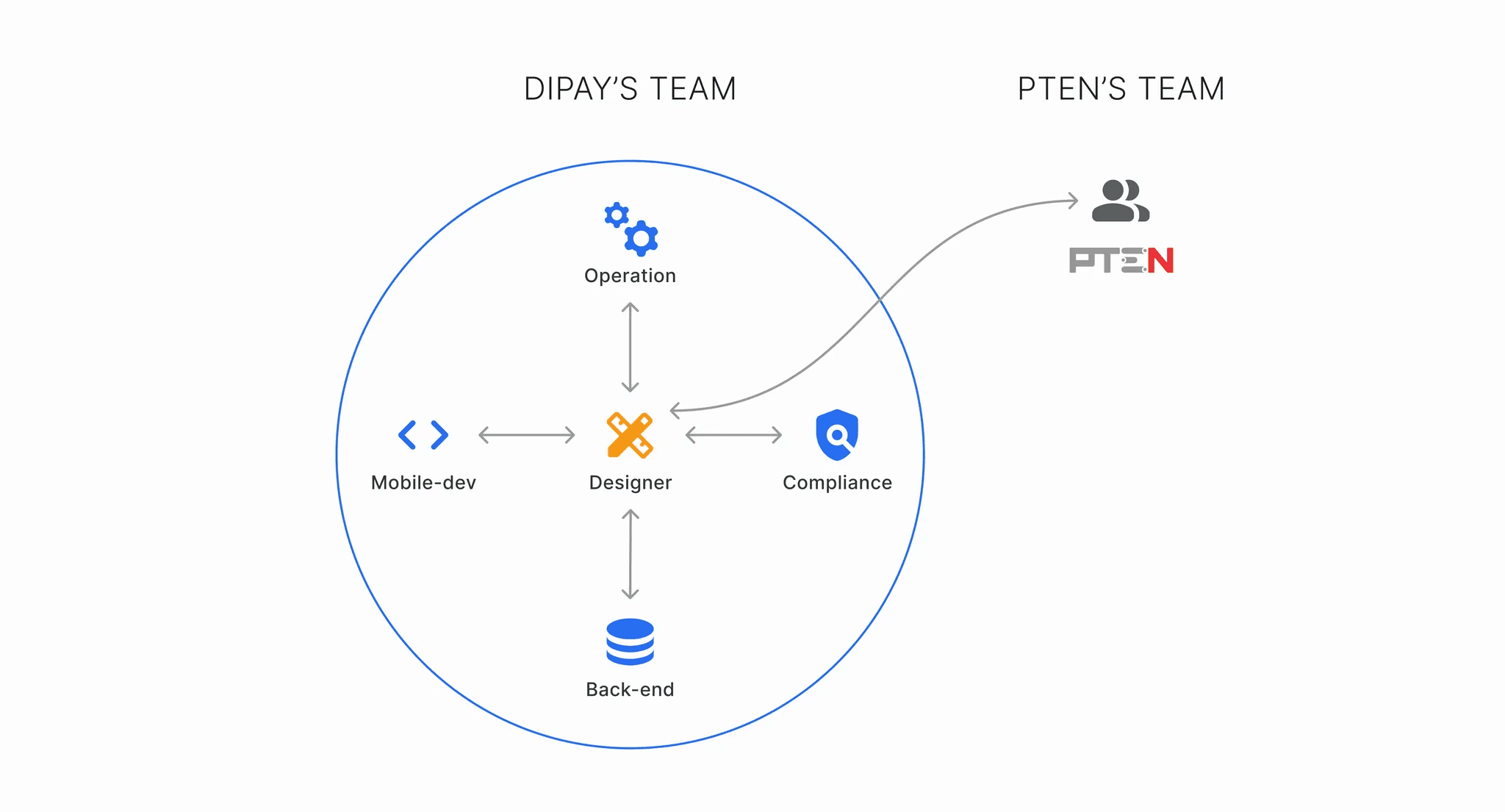
After analyzing and comprehending the feature, it was discovered that the involved teams include operations, compliance, back-end, mobile development, and a cross-company team (PTEN team), necessitating collective discussions. These discussions were conducted sequentially, fostering collaboration and enhancing comprehension of the feature's structure, particularly delving into the rationale / reasoning behind the data required from the user. The collaborative effort also generated diverse ideas, addressing user problems and challenges faced by other teams.
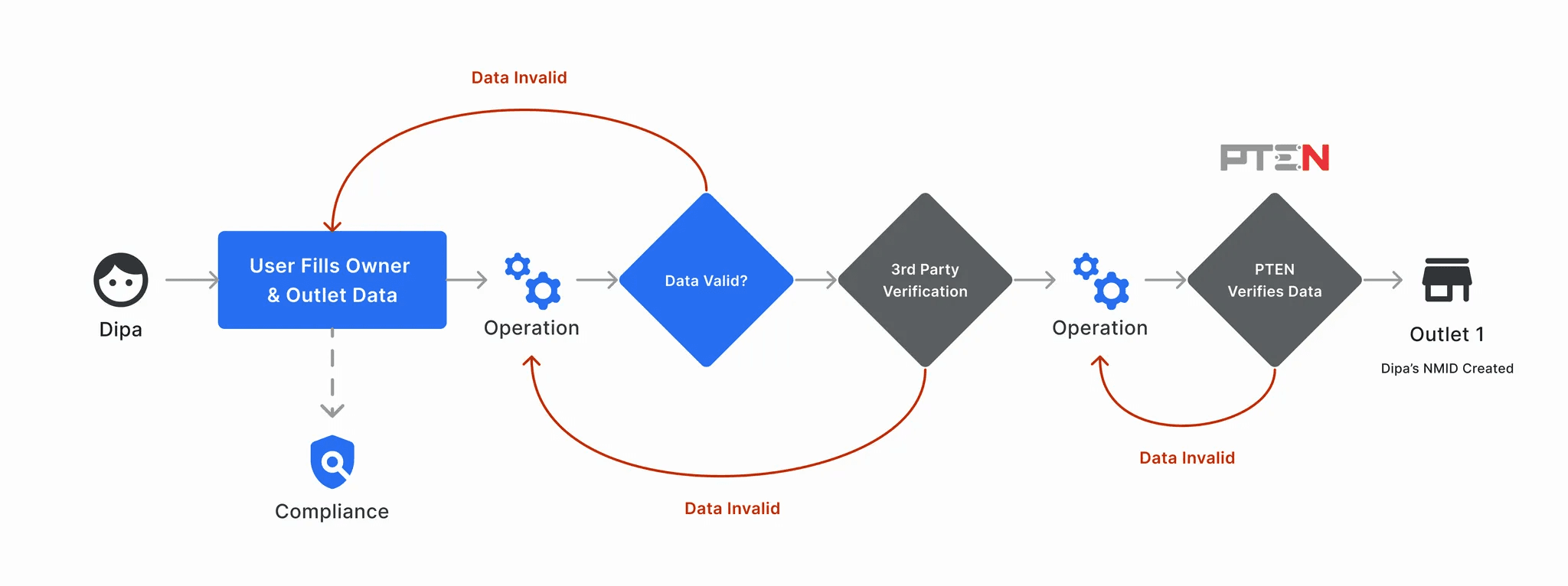
PTEN is a company that specializes in electronic transaction settlement services that plays a significant role in facilitating electronic transactions and financial services in Indonesia. Every new merchant registration needs to go through a verification process with PTEN to ensure regulatory standard across the National Merchant Repository (NMR) and the electronic payment ecosystem. The image below illustrates how a raw merchant data goes through the verification processes until a specific merchant’s NMID were legally generated.
Design 🖋️

The empathize process originates from merchants' feedback regarding the app, serving as the foundation for this feature’s challenge. Merchants in a stable and growing state expressed the common issue of wanting to expand their outlets by creating new branches. They consistently expressed frustration because they had to repeatedly register using different email and phone details each time they wanted to add new branches. Additionally, they expressed a desire to avoid frequent log-outs and log-ins when accessing different outlet accounts.
After comprehending all the required user data and the underlying rationale, the information was systematically mapped out and thoroughly documented. Subsequently, various actions could be taken concerning the data:
Mapping out the data,
Defining distinctions between user-inputted and system-generated data,
Determining which data is allocated to and required by specific teams,
Identifying the data necessary for creating a new outlet account, and
Understanding the limitations associated with each dataset.
Ideate 💡
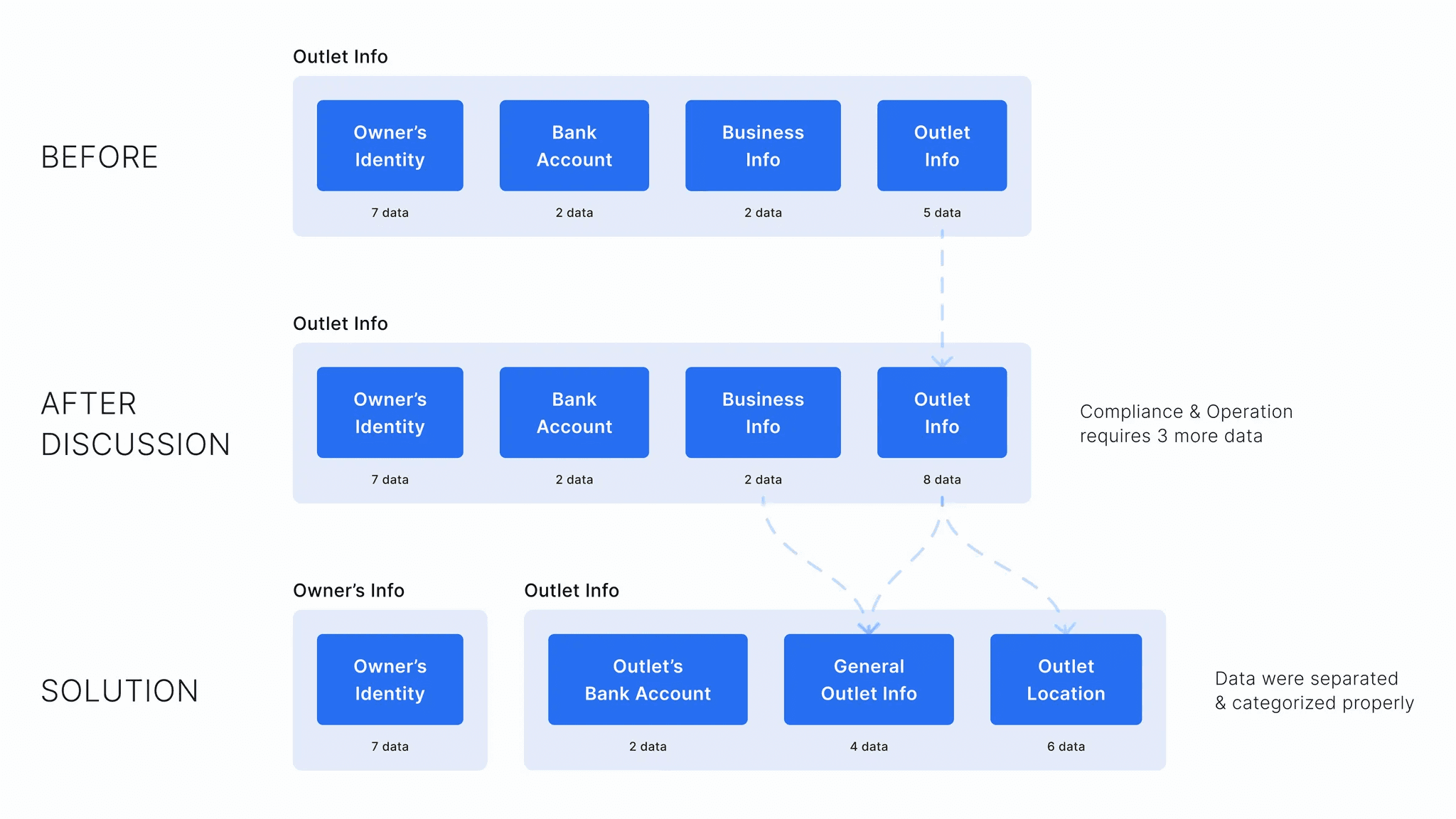
The discussion resulted in a clearer insight, particularly regarding data requirements. Both the compliance and operation teams identified a need for 3 additional data points from users, promising a significant improvement in their workflow for data verification and enhancing overall security. However, the introduction of these three data points may impact the user experience, requiring additional input. To address this, the issue was optimized by categorizing and more evenly distributing the data, thereby reducing the user's cognitive load.
💡
Organizing the data properly creates a flexible and comprehensive approach not only for this feature, but it also opens the opportunity for other features in the future—creating a more proper, flexible, and visionary design environment.
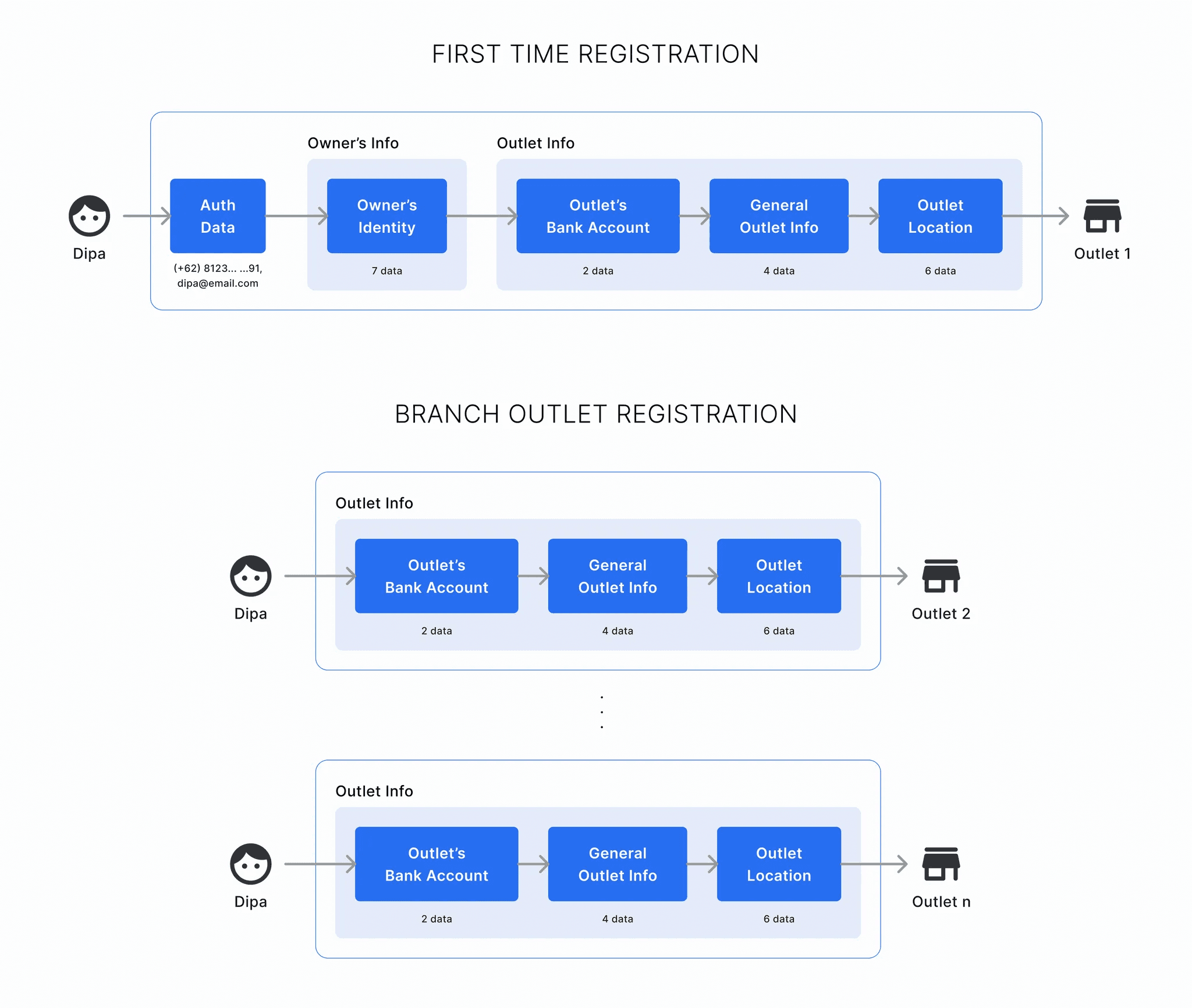
This solution enables a new flow for creating a new outlet. Since it's not possible for a user to possess different authentication data and owner's identity, these same data can be reused when establishing a new outlet, eliminating redundant user input.
Faster and Simpler Touchpoints
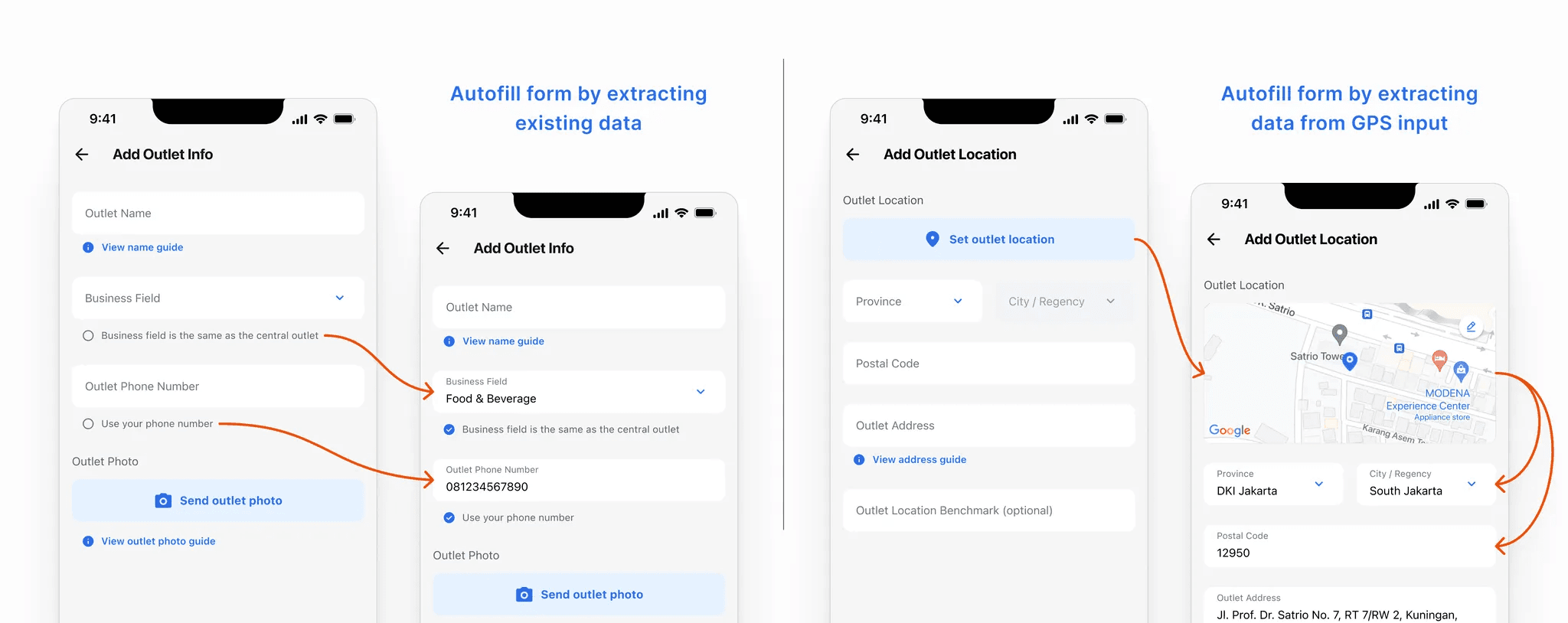
Another approach to eliminate redundant user input could be achieved more efficiently by implementing a check to autofill the form through extracting existing data and utilizing GPS input data. This not only saves significant time for the user but also enhances their overall experience.
Simple Outlet Switching
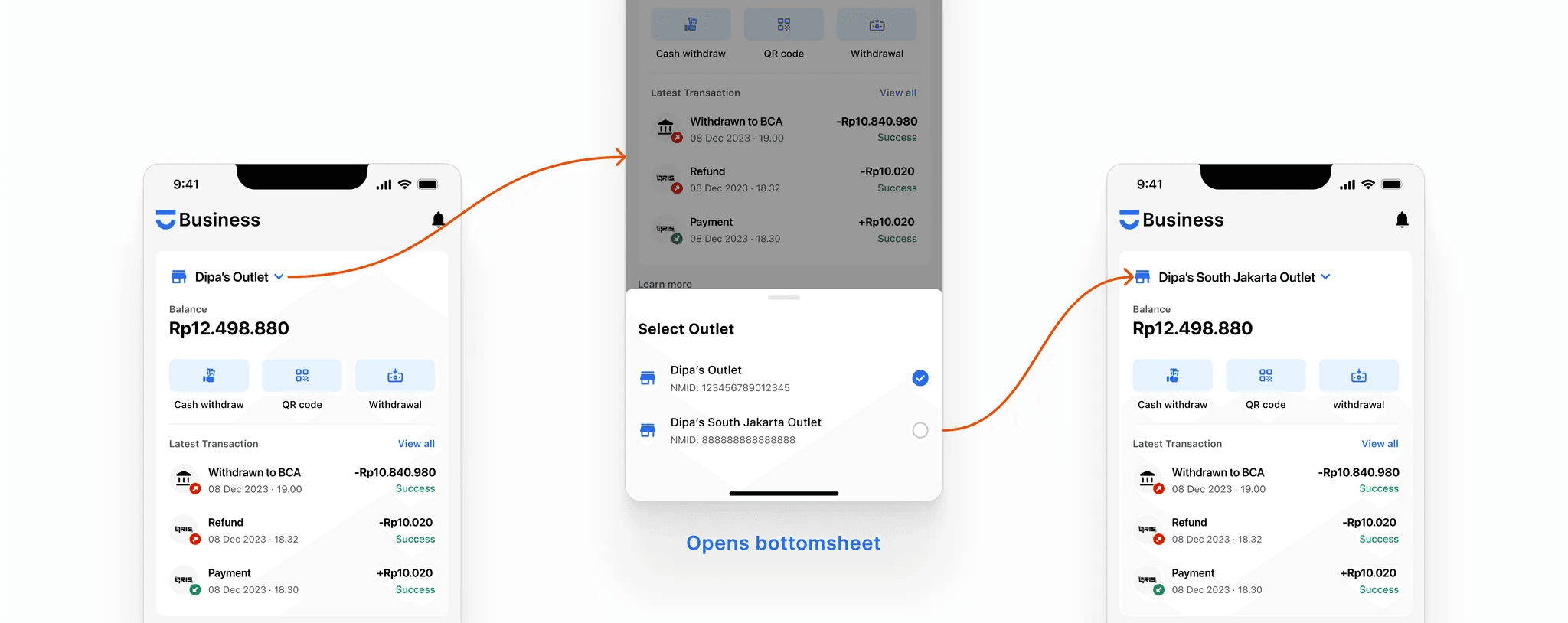
The idea for a simple outlet-switching feature was inspired by Instagram's user-friendly multi-account function, known for its ease of use and widespread familiarity. This is expected to be a more efficient solution compared to competitors, who often use a more complicated method with unnecessary extra steps to switch between outlets.
Screen Flow 🔄
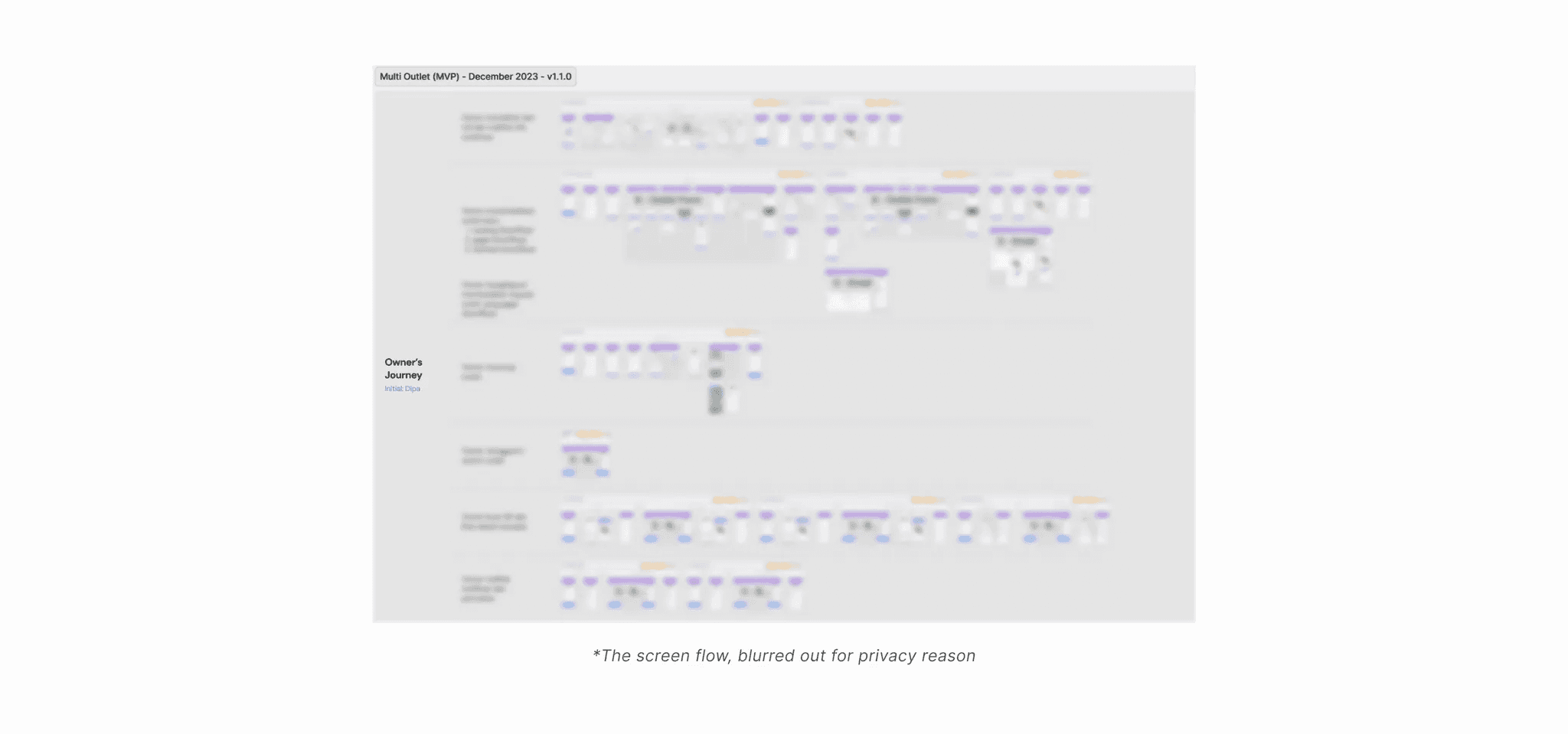
Screen flow represents the path users follow through various screens to accomplish tasks in a digital interface. In Dipay, it is a crucial requirement for designers when passing designs to developers. The designed screen flow considers all possible user scenarios to ensure users can achieve their goals.
Prototype 📱
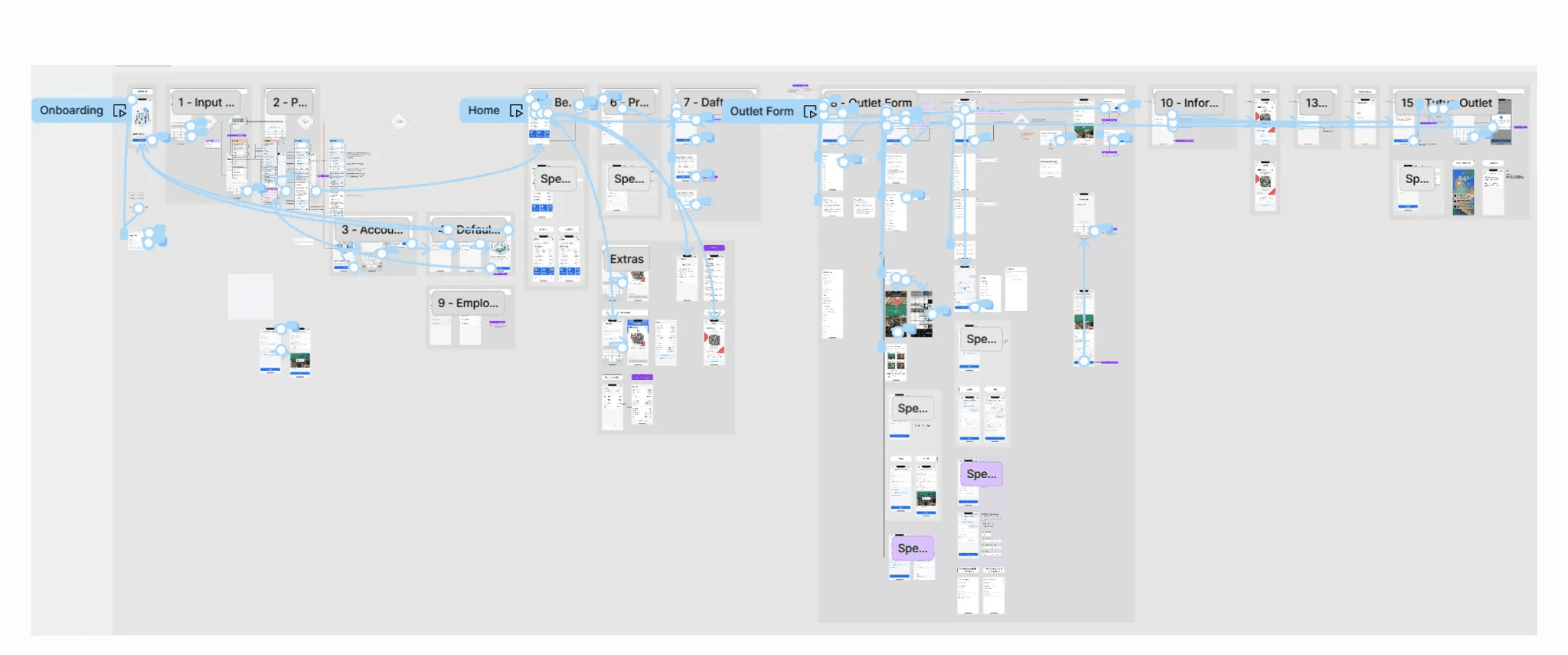
The prototype serves as a tool for designers and the internal team (including QA) to test feature ideas and interactions. Despite being looked as trivial and the fact that it was never implemented by Dipay's previous designers, as a pioneer, it has proven highly effective in communicating ideas between teams and has garnered significantly positive feedback.
Validate ✅
The validation phase entails verifying the design with the teams involved, including stakeholders. This is essential for validating all aspects of the design, such as data, requirements, possibilities, and feasibility. Personally, I break down this validation phase into two smaller stages:
Pre-design validation
Pre-design validation was conducted before initiating any interface design, ensuring a clear understanding of data limitations, its purpose, and the incorporation of conceptual ideas.
"I would like to know whether this data belongs here and serves its intended purpose. Additionally, are there any other considerations that need to be addressed?”
“I have this feature in mind. Is it possible to develop? Could you provide an estimation of the time and resources required to implement such a feature?”
"Is there a limit to how many outlets a user/merchant can have? What are the concerns of the PTEN team regarding this?”
“Would it be possible for the feature to behave in this way or that way?”
Post-design validation
Post-design validation was done after creating the interface, screen flow, or prototype. This was done to validate the feasibility and effectiveness of the design from all the teams involved.
“I have this prototype. Could you please test it out? Let me know if you have any improvement ideas or encounter any inconveniences that may disrupt your workflow as an operation.”
“I have this design. Are there any compliance aspects that need to be considered?”
“What do you think about this design and flow? Is it feasible to develop within a specific timeframe? On a scale from 1-10, please rate the level of difficulty in developing this feature.”
“Do you have any solution ideas so that this feature can be developed with the consideration of your resources?”
With legal and technical hurdles cleared by developers, operations, compliance, and other teams, the design is considered safe and ready for development.
Conclusion 🍎
Dipay Business is addressing a significant challenge where merchants struggle with efficiently registering and managing multiple outlets, leading to frustration and productivity loss. The solution focuses on enhancing user experience, streamlining data management, and ensuring future scalability. Key improvements include simplified registration through reusing existing information, faster data entry with autofill and GPS features, and intuitive outlet switching. Additionally, the solution promotes efficiency and security through streamlined prototyping, cross-team collaboration, and robust security measures. Ultimately, this approach empowers merchants, enhances platform performance, and positions Dipay Business for sustainable growth and adaptability.
📍
This project showcases a holistic, user-centered approach to addressing a crucial challenge for Dipay Business. With a focus on simplicity, efficiency, and security, this solution has the potential to substantially enhance the merchant experience and contribute to the platform's success.